
Back pain at work is common, especially if you spend long periods sitting, working at a laptop, or staying in the same position for most of the day.
The good news is that reducing back pain at work does not usually come down to one “perfect” chair or one magic stretch. It is often about improving your desk setup, changing position more often, building strength, and knowing when to get help.
In this guide, we’ll cover simple desk setup tips, movement habits and exercises that may help reduce back pain during the working day.
Why does my back hurt at work?
Back pain at work is often linked to a combination of posture, prolonged sitting, low movement, stress, workload and reduced strength or conditioning.
Your back is designed to move. Even a good sitting position can become uncomfortable if you stay there for too long. That means the aim is not to find one perfect posture and hold it all day. The aim is to create a setup that reduces strain and makes it easier to move regularly.
How to set up your desk to reduce back pain
A good desk setup should help you sit comfortably without forcing your back, neck or shoulders into awkward positions.
1. Start with your chair
Your chair should support your lower back and allow your feet to rest flat on the floor, or on a footrest if needed.
Try to set your chair so that:
- your feet are flat and supported
- your knees are roughly level with, or slightly below, your hips
- your lower back is supported
- your thighs are supported without the chair pressing into the back of your knees
- your shoulders can stay relaxed
2. Set your screen at the right height
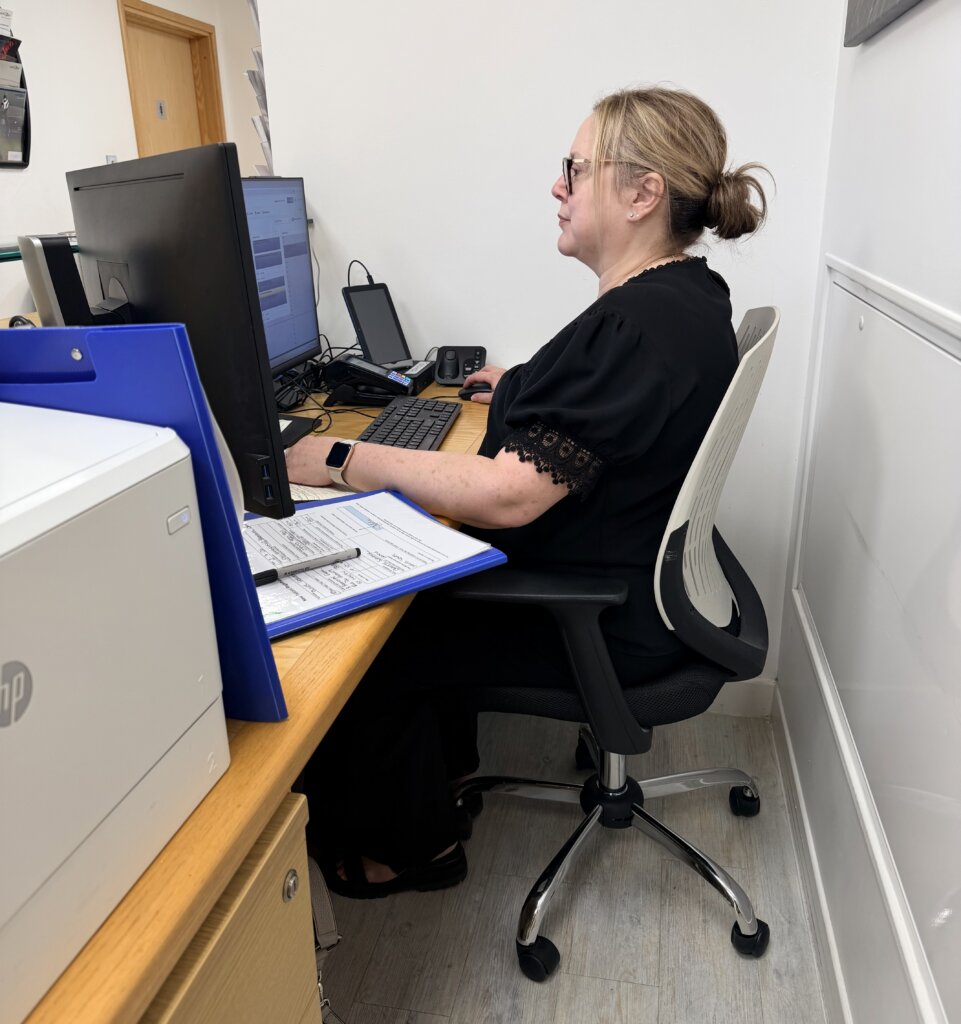
Your screen should be directly in front of you, not off to one side. The top of the screen should be around eye level and roughly an arm’s length away.
This helps reduce the need to lean forward, twist, or look down for long periods.
If you use a laptop for most of the day, consider using a laptop stand or separate screen, plus a separate keyboard and mouse. Working directly from a laptop for long periods often encourages a rounded back and forward head position.
3. Keep your keyboard and mouse close
Your keyboard and mouse should be close enough that you can use them with your elbows relaxed near your body.
Try to avoid:
- reaching forward for the mouse
- shrugging your shoulders
- twisting to one side
- resting your wrists at an awkward angle
4. Avoid staying still for too long
Even with a good desk setup, sitting still for hours can contribute to stiffness and discomfort.
A helpful habit is to change position little and often. This might mean standing up during calls, walking while you think, changing tasks, or taking short movement breaks.
The aim is not to sit perfectly. It is to move more regularly.
Desk setup checklist
Use this as a quick check:
- Screen directly in front of you
- Top of screen around eye level
- Screen about an arm’s length away
- Shoulders relaxed
- Elbows close to your body
- Keyboard and mouse within easy reach
- Lower back supported
- Feet flat on the floor or on a footrest
- Hips and knees comfortable
- No regular twisting to view your screen or reach your mouse
- Regular breaks or changes of position built into the day
Simple exercises to reduce back pain at work
These exercises are general suggestions and should feel comfortable. Stop if they increase your pain, cause pins and needles, or feel wrong for your body.
1. Seated pelvic tilts
This can help gently move the lower back if you feel stiff from sitting.
How to do it:
- Sit upright with both feet on the floor.
- Slowly tilt your pelvis backwards so your lower back rounds slightly.
- Then tilt your pelvis forwards so your lower back gently arches.
- Move slowly between the two positions.
Try 8–10 gentle repetitions.
2. Chair-supported back extension
This can help if you spend a lot of time rounded forward.
How to do it:
- Sit upright with your hands across your chest or behind your head.
- Gently lean your upper back over the back of the chair.
- Keep the movement comfortable and controlled.
- Return to upright.
Try 5–8 repetitions.
3. Seated figure-four stretch
This can help reduce tightness around the hip and glute area, which can sometimes contribute to lower back discomfort.
How to do it:
- Sit tall in your chair.
- Place one ankle across the opposite knee.
- Keep your back straight and gently lean forward from your hips.
- Hold when you feel a comfortable stretch in the hip or glute.
Hold for 20–30 seconds each side.
4. Standing hip flexor stretch
Sitting for long periods can make the front of the hips feel tight.
How to do it:
- Stand in a split stance, one foot forward and one foot back.
- Gently tuck your pelvis under.
- Shift your weight forward slightly until you feel a stretch at the front of the back hip.
- Keep your body upright.
Hold for 20–30 seconds each side.
5. Sit-to-stand
This is a simple way to add movement and strengthen the legs and hips.
How to do it:
- Sit near the front of your chair.
- Keep your feet flat on the floor.
- Stand up without using your hands if comfortable.
- Slowly sit back down with control.
Try 8–12 repetitions.
6. Desk-supported calf raises
This helps add movement and circulation during the day.
How to do it:
- Stand behind your chair or near your desk for balance.
- Rise up onto your toes.
- Lower slowly.
Try 10–15 repetitions.
7. Short walking breaks
This is often the simplest and most useful option.
Try:
- a 2-minute walk every 30–60 minutes
- standing up during phone calls
- walking to speak to someone instead of emailing
- taking stairs where possible
- short lunchtime walks
For many people, regular movement is more useful than one long stretch at the end of the day.
Could Pilates help with back pain from desk work?
Pilates can be useful for people who struggle with recurring back stiffness or discomfort from desk-based work, especially when the goal is to improve control, strength, posture awareness and general movement confidence.
It is not about forcing a “perfect posture”. It is more about helping your body tolerate everyday positions better, move more freely, and build strength around the trunk, hips and pelvis.
At Freedom Physio & Wellness, physio-led Pilates may be helpful if your back pain is linked to long periods of sitting, poor movement habits, or feeling stiff and weak through your back and hips.
For more individual support, 1:1 reformer Pilates can offer a more tailored approach, especially if you are recovering from pain, returning to exercise, or want guided support before joining a group class.
When should I see a physio for back pain at work?
You should consider booking a physiotherapy appointment if:
- your back pain keeps returning
- pain lasts more than 1–2 weeks
- it affects your work, sleep or daily movement
- you feel pain travelling into your leg
- you get pins and needles, numbness or weakness
- you are relying on painkillers to get through work
- you are unsure what exercises are safe for you
Seek urgent medical advice if you have back pain with symptoms such as loss of bladder or bowel control, numbness around the saddle area, serious trauma, fever, unexplained weight loss, or severe worsening pain.
How physiotherapy can help with work-related back pain
A physio can help you understand what may be contributing to your back pain and create a plan that fits your work, lifestyle and goals.
At Freedom Physio & Wellness, this may include:
- a physiotherapy assessment
- advice on desk setup and movement habits
- hands-on treatment where appropriate
- exercises to improve mobility and strength
- physio-led Pilates to support posture, control and movement confidence
- 1:1 reformer Pilates for more tailored support
- strength and conditioning rehab if your back pain keeps coming back
- sports therapy if work-related pain is also affecting training, running or sport
If your workplace wants to be more proactive, Freedom also supports corporate wellness through education and advice around common workplace pain patterns.
Book an appointment
If back pain is affecting your working day, we can help you understand what is causing it and what to do next.
FAQ section
What is the best sitting position for back pain at work?
The best position is one that is comfortable, supported and easy to change. Keep your feet supported, your lower back supported, your screen in front of you, and your keyboard and mouse close enough that your shoulders can relax.
Is standing better than sitting for back pain?
Standing can help because it changes the load on your body, but standing all day is not ideal either. The best approach is usually to vary your position between sitting, standing and walking.
How often should I move if I sit at a desk all day?
A good starting point is to move every 30–60 minutes. This could be a short walk, a standing phone call, a few gentle stretches or simply changing position.
Can exercises help reduce back pain at work?
Yes, exercises can help, especially when they improve movement, strength and tolerance. However, the right exercises depend on your symptoms, so persistent or worsening pain should be assessed by a physio.
Can Pilates help with back pain from sitting at a desk?
Pilates may help some people with desk-related back pain by improving movement control, strength, posture awareness and confidence. Physio-led Pilates or 1:1 reformer Pilates can be useful if you need more support or a tailored starting point.
When should I book a physiotherapy appointment for back pain?
Book an appointment if your pain lasts more than 1–2 weeks, keeps returning, affects work or sleep, travels into your leg, or comes with pins and needles, numbness or weakness.


